

How Pay-Per-Use GPU Computing Benefits AI Workloads
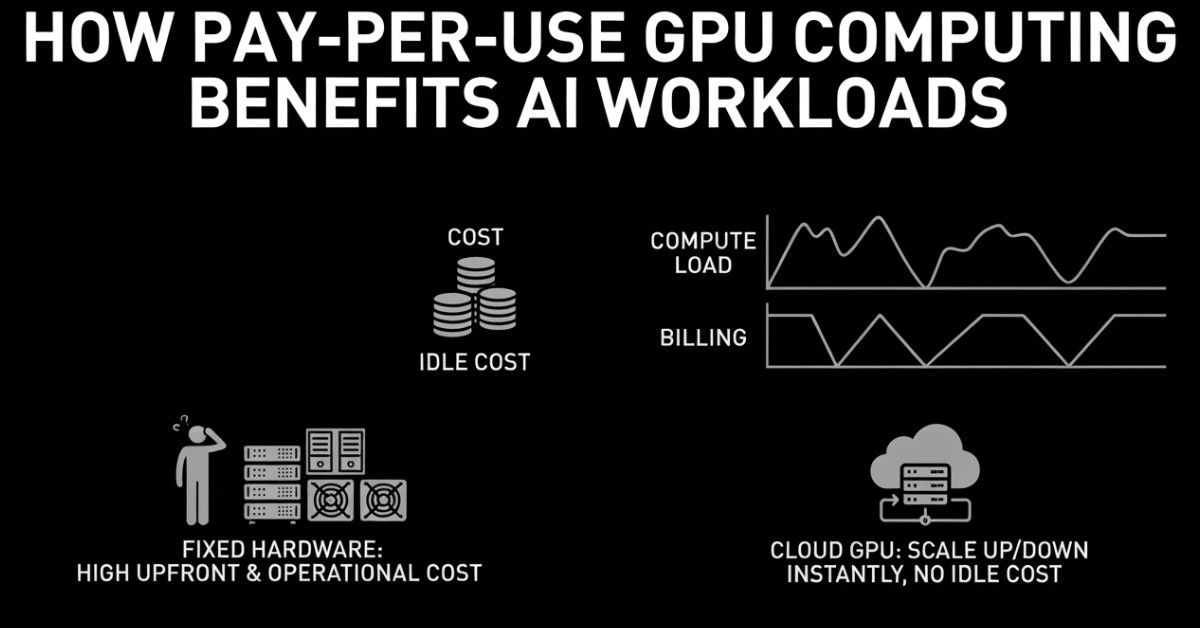
GPU spending is often difficult to predict. Training workloads can vary significantly, and idle resources can quietly increase costs, making monthly infrastructure expenses harder to control. This challenge becomes even greater when organizations invest in hardware outright, as ownership comes with fixed costs regardless of actual usage. Pay-per-use GPU computing addresses these challenges by aligning costs with actual consumption, which is why many AI teams are increasingly adopting this model.
This post walks through what the model actually looks like, the benefits it brings to real AI workloads, how it stacks up against other options, and which teams get the most out of it.
Understanding the Challenge of GPU Budgeting
Artificial intelligence workloads are genuinely unpredictable. A training job might push several GPUs to full load for two days straight, then go quiet for a week while the team looks at results. Inference traffic climbs during working hours and barely moves at night. Also, seasonal products see massive spikes.
AI workloads are built around operations like matrix multiplications, attention layers, and gradient updates that need extreme parallelism and very high memory bandwidth, which is why GPU computing is so central to the whole thing. But owning that hardware comes at a real price.
A high-end GPU unit runs between $9,500 and $14,000, and enterprise models can go up to $40,000, not counting servers, cooling, or anything else that keeps the setup running.
Spending that kind of money on hardware that sits idle a large portion of the time is a genuinely tough argument to make, especially for teams that are still figuring out their actual production needs.
What Does Pay-Per-Use GPU Computing Mean
Pretty much what it sounds like. You access GPU computing for AI workloads through a cloud provider, run your job, and pay for that time only. Job done, billing stops. No hardware aging in a rack, no cooling system running for machines that are not doing anything.
On-demand pricing works on hourly rates during active usage, from under $1 per hour on the lower end to $15 or more for enterprise-grade GPUs, which makes it a natural fit for teams with variable or hard-to-predict workloads. For a detailed comparison of different cloud GPU options, see how GPU cloud marketplaces compare for developers.
When the training run is done, the meter stops. When a bigger experiment needs more compute, you scale without waiting weeks for procurement to move. The shift toward pay-per-use services that remove large upfront capital costs is one of the main forces driving growth in this part of the market.
What Teams Gain from On-Demand GPU Access
Teams that have switched to on demand GPU resources tend to bring up the same things when talking about what changed.
Experiments get cheaper:
When computing is available on demand, you stop skipping architecture tests because of cost. Getting something wrong costs a few hours of billing rather than a poor procurement decision.
Idle Waste disappears:
In fixed setups, GPUs running through debugging sessions, internal reviews, or overnight windows waste between 30 and 50 percent of total spending. Usage-based billing removes that entirely.
Better hardware
Owning GPUs means you are stuck with that generation until the next budget cycle. Cloud GPU computing gets teams onto H100s, H200s, and newer hardware without ever managing a refresh.
Scaling that follows demand:
Production inference is not flat. On demand GPU resources scale based on what is actually happening, not what someone estimated during capacity planning six months ago.
No infrastructure problem:
Cooling, driver updates, failing hardware, and rack space. All of that sits with the provider. Engineering time goes toward the work that actually matters.
How the Main Options Compare
The provisioning decision shapes cost, velocity, and risk. Here is how the common approaches measure up for gpu computing for ai workloads:
Which Teams Benefit Most
- Early-stage teams and startups building AI products cannot afford to sink capital into hardware before they have a real read on production demand. Keeping compute on usage-based billing leaves runway intact and options open.
- Research teams working in cycles, bursts of training followed by review and iteration, only get billed during active compute time. The quiet gaps between jobs cost nothing.
- Enterprises running AI applications with variable traffic find that cloud GPU computing handles demand without manual effort or over-provisioning.
Making the Switch Without Overdoing It
There is no need to migrate everything on day one. Most teams start by moving their most irregular workloads over, training jobs, and batch tasks where timing is hard to predict. More stable production inference traffic can follow once actual usage patterns become clearer.
Batching inference requests, compressing models through quantization, and using autoscaling to match GPU count to live demand can bring cloud bills down by 30 percent or more without affecting output quality.
The goal is straightforward. Stop paying for compute that is running but not doing anything useful.
Wrapping Up
Artificial intelligence workloads change constantly, and infrastructure that charges a fixed rate regardless of use is always going to cost more than it should. Pay-per-use GPU computing ties cost to actual usage, so the bill reflects what got done, not what was available. Hardware is there when the job runs and off the invoice when it is not.
For teams that want to build and run AI without carrying idle compute costs, cloud GPU computing on a usage-based model is a clear step in the right direction. AITECH Cloud Network's GPU infrastructure is built around that kind of flexibility, compute that fits what you are actually doing, ready when you need it.
FAQs
1. What is pay-per-use GPU computing?
You rent GPU power from a cloud provider and only pay for the hours you actually use. Run your job, pay for that time, move on.
2. How does pay-per-use GPU computing benefit AI workloads?
AI computing is inconsistent by nature. Training burns through resources for days then drops off completely. Your costs follow that same pattern instead of running at full price the whole time.
3. Is pay-as-you-go GPU computing more cost-effective than dedicated infrastructure?
For most teams, yes. Owned hardware charges you the same whether it is maxed out or sitting idle.
4. Which AI projects benefit most from on-demand GPU resources?
Anything unpredictable. Model training, fine-tuning, batch processing, and research experiments. If your compute needs shift week to week, on-demand makes more financial sense than committing to fixed capacity.
5. How do cloud GPU services support machine learning and deep learning?
You get powerful hardware without managing any of it. Scale up for a heavy training run, pull back after. Everything underneath is the provider's responsibility.
6. What should businesses consider when choosing a pay-per-use GPU provider?
Start with pricing transparency. Storage and data transfer fees catch people off guard. After that, look at available hardware generations, how quickly you can scale, and whether support actually responds when things break.


344.svg)